

What happens after your client leaves feedback
The live demo puts you in your client’s seat: click an element, type what is wrong, sign the page off. This is the other seat. What actually lands with you, what one click does to a page, and what changes when you hand over a whole site instead of a single URL.
-
1 Included in Free
The comment arrives where you already work
Your client never logs in and never opens a ticket. You get the comment attached to the element it is about, on the page it is on, with the screenshot already taken.
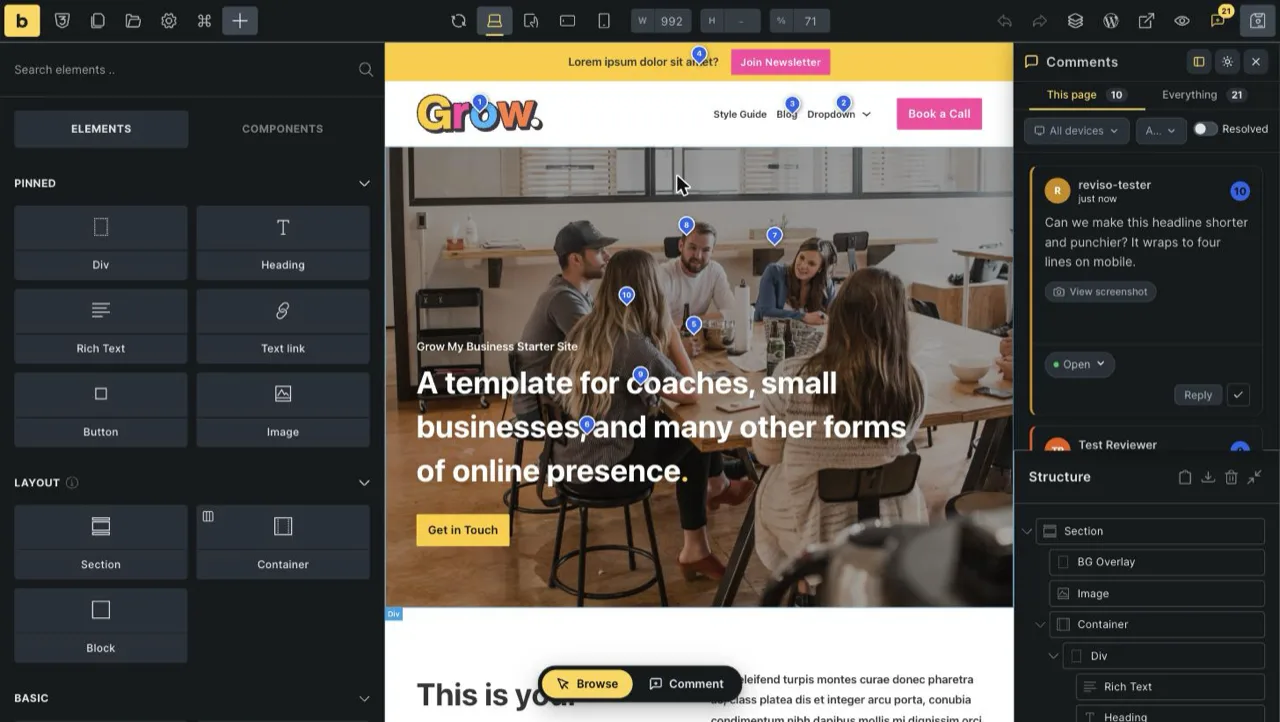
Bricks builder, Comments panel open. The panel counts This page and Everything separately, so one site‑wide number tells you what is still outstanding. - Anchored to the element, not to a coordinate. The pin survives you editing the page around it.
- Screenshot captured automatically when the comment is written, plus the browser, OS and viewport it was written on.
- Threaded replies and a status (Open, In progress, Resolved) so a question gets answered in place instead of in an email.
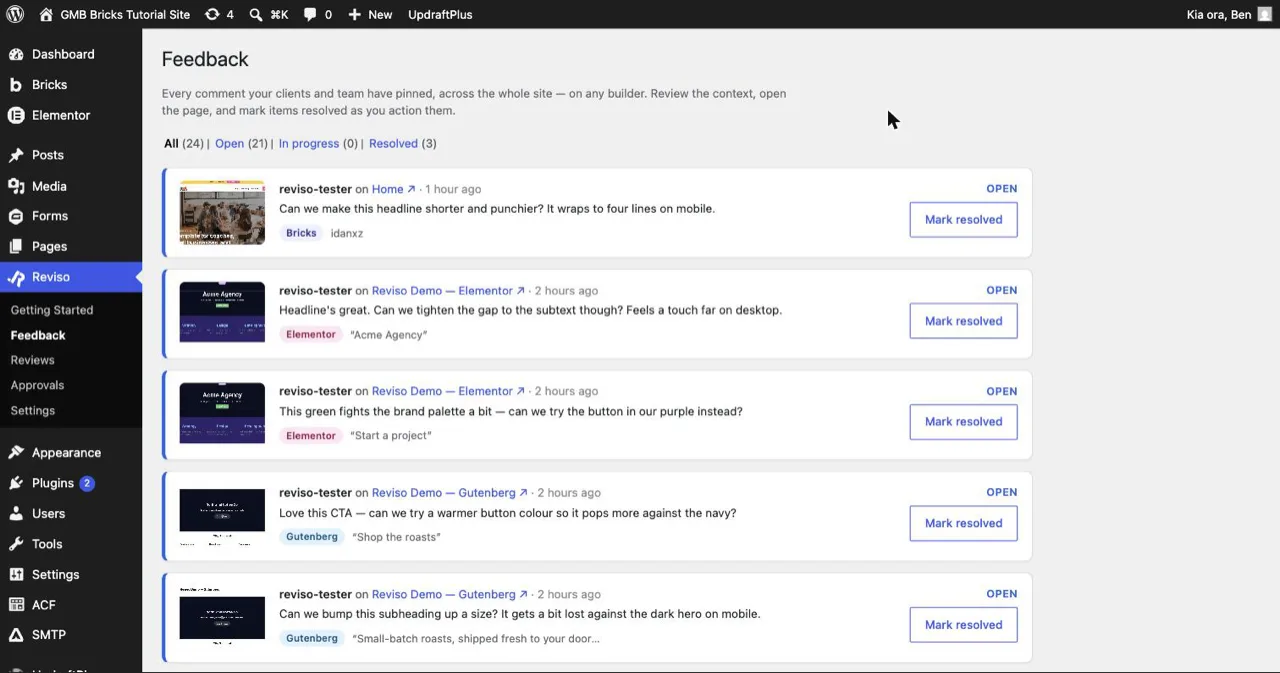
The same comments in Reviso › Feedback in wp‑admin: every pin across the whole site, on any builder, filtered by All / Open / In progress / Resolved. And the email you get
[Acme Coffee] 3 new comments on “Home”
Batched, not one per click — so a client working through a page is one email, not eleven. On Pro you can move this to a daily or weekly digest instead.
-
2 Applying is Pro · Bricks
A wording change stops being a job
Most review rounds are not design decisions. They are copy. In Suggest mode the client edits the text on the page and you get the before and the after, not a description of them.
Applied!
- Reviso snapshots the page first, so the edit is revertable.
- It finds the setting that holds the Before text verbatim and writes the After text into your Bricks page.
- The thread resolves itself. You did not open the builder.
- Proposing and rejecting a suggestion are free. Applying one into the page is Pro, and only on Bricks — that is the builder Reviso can write back into.
- It refuses rather than guesses. If the text has moved since the suggestion was made, or the value is dynamic, the apply stops and the suggestion is kept for you to do by hand. It never rewrites a page it is not certain about.
- You choose who can apply. Team-applies is the default; a single review can be opened up so a client can apply their own suggestions.
-
3 Multi‑page review is Pro
Hand over a site, not a page
The free plugin shares one page at a time, which is fine for a fix and wrong for a launch. Pro sends one link that covers the pages you pick — or the whole site — and tracks which of them the client has actually been through.
1 of 6 pages marked reviewed
- Home Reviewed
- About To do
- Shop To do
- Our roasters To do
- Wholesale To do
- Contact To do
A walkthrough of the real reviewer dashboard, not a live site.
All six pages reviewed
[Acme Coffee] Pre‑launch review: review finished, ready for you
Jo has finished reviewing Pre‑launch review and it’s ready for you.
6 of 6 pages marked reviewed.That is the email the client’s “I’m done” turns into. One arrival, with the count, instead of a message asking whether they have finished yet.
- Pro — multi‑page and whole‑site reviews, applying suggested edits on Bricks, email‑gated reviews and magic links, per‑review expiry, daily or weekly digests, AI summaries and triage, and a signed PDF approval certificate. 3 sites, $9/month or $89/year.
- Agency — everything in Pro, plus white‑label: your logo, colours and agency name on the client‑facing review, and unlimited site activations, Slack / Discord / webhooks and priority support. $29/month or $279/year.
- The 14‑day trial runs at Agency level, so white‑label is in the trial even though it is not in the standard Pro plan. No card.
Try it on a real client project
The sandbox is a sandbox. The honest test is one page of something you are actually building: install the free plugin, share a review link with a client who has opinions, and see what comes back.
Jo (client) · just now
A walkthrough of the real panel, not a live site.